
How to Create a URL Prioritisation List for SEO Site Migrations
One of the more concerning myths about website migrations is that you simply need to move ‘what is currently on the site’ to the new location. This approach risks skipping any legacy URLs with value that are no longer active. Think, old URLs linked externally that currently redirect to a live URL.
We see this regularly in failed, or poorly managed, migrations. The list of “old” urls was either: a) taken from a XML sitemap, or b) a live crawl of the site.
Both an XML sitemap and a web-crawl will miss pages. XML sitemaps are meant to be there to tell search engines what your most important pages are. XML sitemaps are not a definitive list of all your pages. Similarly, a live web crawl is only as good as the internal linking on the site itself. If there are issues rendering pages or navigation elements, or client-side javascript preventing a full crawl of content (eg a blog post archive that is not crawlable) then the web crawl will miss pages also.
XML sitemaps and web crawls also do not account for legacy URLs that have link equity and may currently redirect to the “live” site. If existing redirects are skipped in the “current URLs” file you will lose this link value in the migration.
The solution:Create a URL prioritisation list that combines “current” URL lists with data from:
- Analytics (GA4, Adobe Analytics),
- Google Search Console, Bing Webmaster Tools,
- Link Profile Data (ahrefs, Moz, Majestic).

How to Create a URL Prioritisation List
Creating a URL Prioritisation List is the process of merging technical data with performance metrics to decide exactly which pages must be migrated, redirected, or pruned. This list becomes your “source of truth” for the entire project.
Here is how to build a URL prioritisation List, Step-by-step.
Step 1: The Technical Baseline (The Crawl)
Your foundation is a complete inventory of what currently exists. You need to crawl the legacy site using your crawler of choice, e.g. Screaming Frog, Lumar (formerly Deepcrawl), or Sitebulb.
- Don’t limit yourself to HTML:Your crawl must include images, PDFs, and other assets. These files often accumulate backlinks and traffic but are frequently forgotten during migrations.
- Include meta data (<title>, meta description), and Headings (h1, primary h2, primary h3). This will help with bulk redirect mapping.
- Pro Tip: Extract Main Body Content from the legacy site during crawl and record in the prioritisation spreadsheet. This additional context can really help with redirect mapping, especially for complex sites with many related pages.
- Bypass restrictions: Ensure you crawl staging environments if applicable and configure your crawler to ignore robots.txt so you capture URLs that might be blocked but are still receiving traffic.
- Identify Indexable Pages:Filter your crawl to identify currently indexable pages (Status Code 200). These are the pages that potentially drive traffic right now.
Step 2: Layering User Value (GA4 Data)
A URL might exist technically, but is it useful? You must overlay traffic data to understand user behavior.
Export data from Google Analytics 4 (GA4) covering at least the last 12 months to account for seasonality. Merge this data with your crawl list to highlight:
- Top Traffic Drivers: Which URLs bring in the most sessions?
- Revenue Generators: Which pages drive conversions and revenue?
- Engagement: Which pages have high engagement times or assist in the user journey?
If a page has high traffic but is slated for deletion, you have a major risk on your hands. This data allows you to flag it as a “Strategic Page” that requires a 1:1 redirect or a content migration.
Step 3: Layering Search Visibility (GSC Data)
Traffic doesn’t tell the whole story; some pages rank well and receive impressions but might not get clicks yet. You need to protect this potential.
Export performance data from Google Search Console (GSC) for the last 90 days to 12 months. Look for:
- High Impression URLs: Pages that Google likes but perhaps users haven’t clicked yet.
- Ranking Keywords: Pages that rank for business-critical keywords.
This step often reveals “orphan pages” URLs that are not linked in your current site structure (and therefore missed by your crawler) but are still indexed and ranking in Google.
Step 4: Protecting Link Equity (Backlink Profile)
This is the most critical step for preserving your Domain Authority. You must identify every URL on your site that has earned a backlink from an external website.
Use tools like Ahrefs, Majestic, or Semrush to export your full backlink profile.
The Golden Rule: Any URL with quality backlinks must be 301 redirected to a relevant destination on the new site.
- Why it matters: If you delete a page with backlinks and don’t redirect it, you sever the connection, and that “link juice” is lost forever. This is a primary cause of post-migration ranking drops.
Step 5: The “Hidden” Equity (Legacy 404s)
Advanced SEOs know that a migration is the perfect time to fix past mistakes. Over the years (or decades), your site has likely accumulated URLs that were deleted without proper redirects, bleeding equity every day.
- Use a tool like Ahrefs to look at top links and then filter for 404 (Broken) pages. These are pages that no longer exist but still have external links pointing to them.
- The Wayback Machine: If you are inheriting a “botched” site or one with a messy history, use the Wayback Machine API to generate a list of historical URLs.
Action Item: Add these broken URLs to your prioritisation list and map them to relevant current pages. This “reclaims” lost authority and can actually result in a traffic boost post-migration.
Step 6: Categorisation (The Master Sheet)
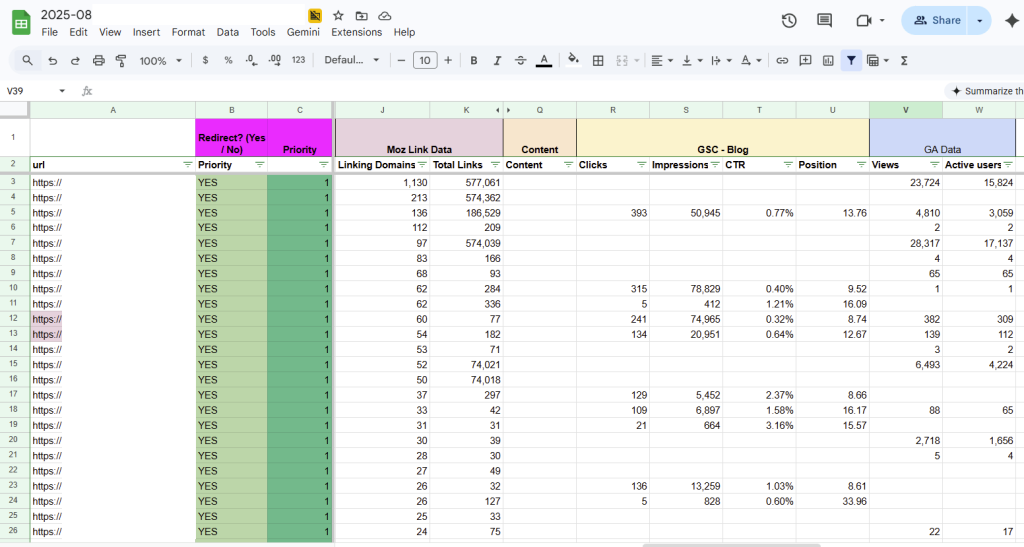
Once you have merged data from your Crawler, GA4, GSC, Backlink tools, and historical archives into a single spreadsheet, you can categorise every URL.
Your Prioritisation List should tag every URL with a decision,:
- Keep/Migrate:Strategic pages that move to the new site.
- Consolidate: Pages competing for the same keywords that should be merged into one stronger asset.
- Redirect (301): Pages being removed but containing link equity or traffic history.
- Prune (410):Low-value pages with no traffic, no links, and no strategic value.
By building this data-driven prioritisation list, you move from “hoping” the migration goes well to guaranteeing you have accounted for every bit of value the website has earned over time.